
Xcode 27 puts AI coding agents inside your localization workflow. They translate every UI string in your app using the context already stored in your String Catalogs, hold consistent terminology across new features, and let you ship localization in an afternoon instead of a quarter. For indie iOS developers, this changes localization from a project-sized decision into a normal feature decision.
I have shipped multiple paid iOS apps. Localization was always the feature I pushed to next quarter, because the workflow used to mean a vendor budget, an XLIFF export, and weeks of back and forth. Xcode 27 collapses that loop into a single conversation with an agent that already sees your code. This post walks through what the new flow actually does, where the agent stops being enough and you still need a native speaker, and how localization changes the revenue math when you pair it with proper App Store pricing.
On this page
- What changed in Xcode 27
- The agent translation workflow
- How String Catalogs make agent translation work
- Xcode 27 agents vs older translation approaches
- Plural and grammatical variation, handled
- Iterative refinement and project-wide consistency
- UI verification: catch truncation before users do
- What still requires a native speaker
- Best practices for the new workflow
- The growth math for indie iOS apps
- Action plan: minimum viable localization launch
- FAQ
What changed in Xcode 27
In earlier versions of Xcode, translating an iOS app meant exporting localizations to XLIFF, sending them to a vendor or translation tool, integrating the result back, and dealing with the fact that strings carried almost no context. A translator working on the word "book" had no way to know whether you meant a thing to read or an action to reserve a hotel room. The wrong choice was invisible until a user noticed.
Xcode 27 collapses that loop. Inside Xcode, you tell a coding agent to translate your app into a target language. The agent and Xcode work together, step by step, to discover every localizable string, write the translations directly into your String Catalogs, and keep new features consistent with previous translations on subsequent runs.
The capability builds on two years of compounding String Catalog improvements:
- In 2024, Xcode started tracking where in code each string is used. This added the missing link between a string and its surrounding context.
- In 2025, Xcode started tracking how each string is used so it could auto-generate descriptive comments for translators.
- In 2026, Xcode 27 brings agents into the loop so all of that context flows directly into the translation step, no copy-paste required.
The Xcode 27 translation feature is not a smarter model. It is the same model class you have used for code, with dramatically richer input. That distinction matters for how you should expect it to behave.
The agent translation workflow
The flow is the same whether you are starting from zero or adding one new language. When you tell the agent to translate your app into a target language, Xcode 27 runs five steps in order:
- Prepare the project for localization. Xcode adds the target language to your project settings.
- Build every target on every supported platform. This is how Xcode discovers the full set of localizable strings, including ones a static analyzer would miss.
- Write newly discovered strings into String Catalogs. If you do not have a catalog yet, Xcode creates
Localizable.xcstringsautomatically, plus one per custom table name you used in code. AString(localized: "...", table: "Greetings")call lands inGreetings.xcstrings. - Split the strings into batches and hand each batch to a translation subagent.
- Translate each batch with context. Each subagent receives per-string context: where in code the string is used, related strings using similar terminology, and how the string was translated for other languages already in the project.
The first three steps are what make the rest work. By the time a subagent sees a string, it knows what the string is and what other strings around it have already become in this language.
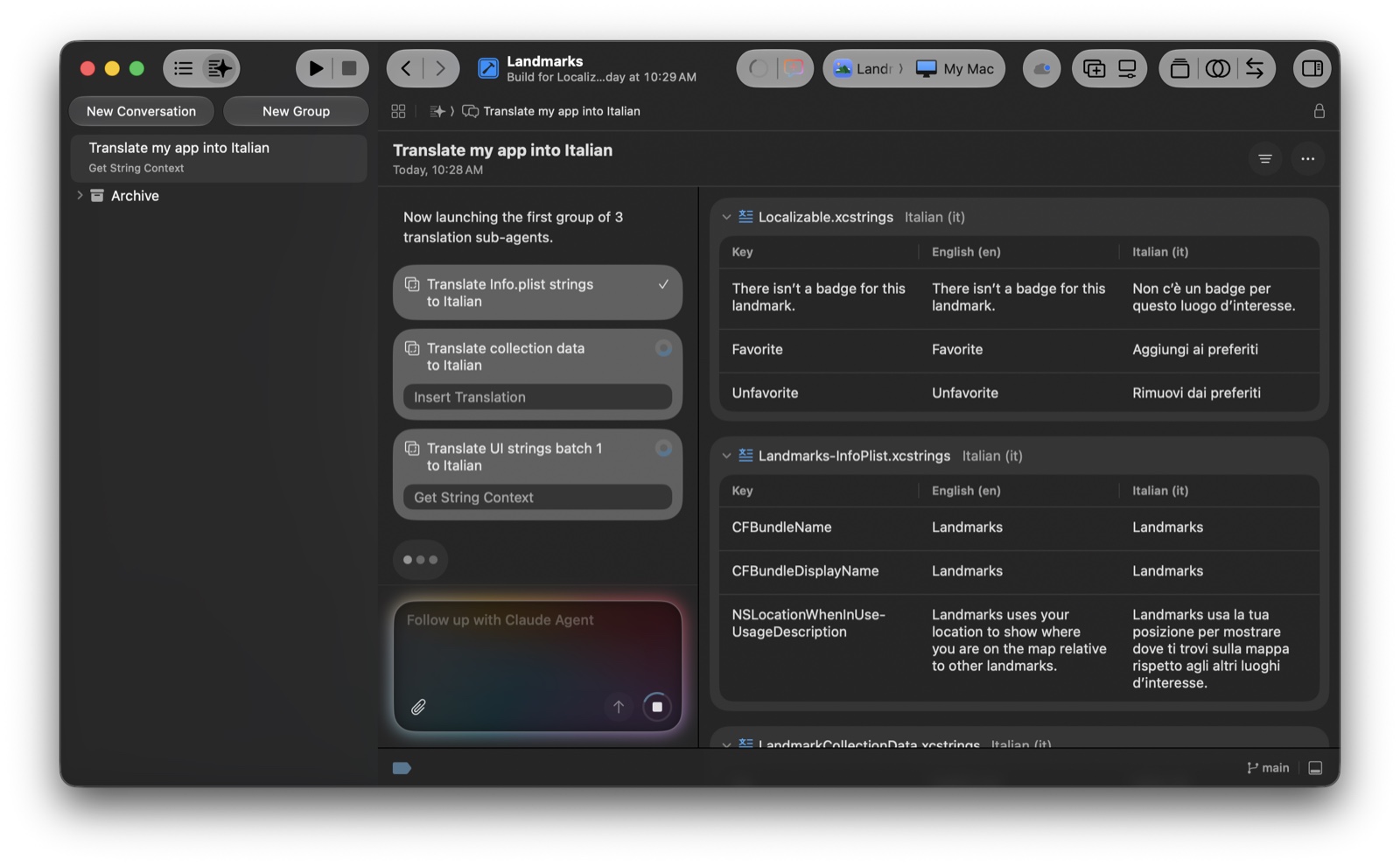
You watch all of this happen in a dedicated translation conversation next to your code. Sub-agents run in parallel, each one shows its current tool call (for example Get String Context, Insert Translation), and the catalog files on the right update live as new translations land:
If you want the full walkthrough end to end:
How String Catalogs make agent translation work
If your iOS app is SwiftUI-first, you have less work to do than you think. SwiftUI APIs like Text, Button, TextField, and Label automatically expose their string arguments as localizable, which means the agent finds them on the discovery pass without you marking anything by hand. For a refresher on the broader SwiftUI surface, see our guide to getting started with SwiftUI.
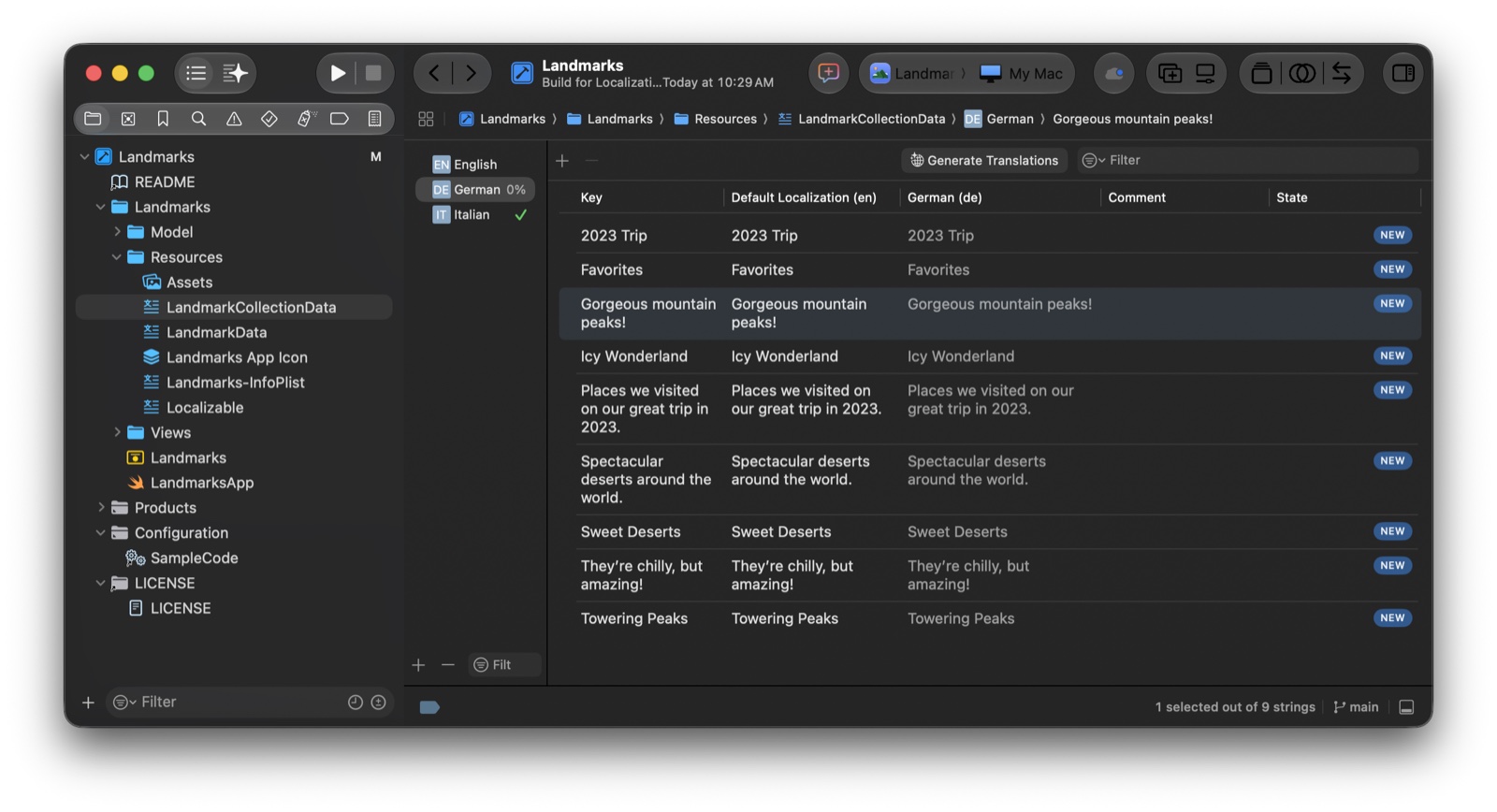
Translations land in String Catalog files (.xcstrings) you can open and edit directly in Xcode. Each row pairs an English source string with its translation in every target language, plus a state marker (NEW, STALE, REVIEWED) so you can see at a glance which entries still need human review:
Everything outside SwiftUI needs an explicit localization API. The canonical one is String(localized:):
let title = String(localized: "Welcome back")
let body = String(
    localized: "Tap to subscribe",
    comment: "Shown above the paywall CTA when user is unsubscribed."
)
Strings passed through String(localized:) (or LocalizedStringKey, or NSLocalizedString) land in the String Catalog. Strings constructed by raw interpolation ("\(rawValue) items") do not. Audit your codebase for user-facing string literals and convert them before you run the agent. Anything you miss stays in English no matter how strong the model is.
Practical rule: every string a user can see in your UI should come from
String(localized:)or a SwiftUI API. If it does not, it cannot be translated by anything, agent or human.
The comment parameter is worth filling in even when the agent does most of the work. Comments are the cheapest insurance against the "book" disambiguation problem: a one-line comment turns an ambiguous string into a precise one, and Xcode 27's agents read those comments as primary context.
Xcode 27 agents vs older translation approaches
The choice space for iOS localization used to be narrow and slow. Xcode 27 changes the trade-offs:
| Approach | Setup time | Per-language cost | Consistency across features | Where it stops working |
|---|---|---|---|---|
| Hand-translate strings yourself | None | Your time | Strong if you speak the language | The languages you do not speak |
| Hire a vendor (XLIFF round trip) | Days | $0.10 to $0.20 per word | Vendor-dependent; degrades on new features | Cost compounds per feature release |
| Generic LLM, copy and paste | Hours | Low | Weak, no project context | Plural variants, terminology drift, ambiguous strings |
| Xcode 27 translation agents | Minutes | Cost of model tokens | Strong, context-aware by default | Cultural nuance, brand voice, App Store reviewer scrutiny |
The honest comparison is not "Xcode 27 agents replace translators." It is that the agents close the gap between a generic LLM call and a vendor workflow. You get most of the consistency that vendors charge premium rates for, without the per-feature round trip. The native-speaker review step does not go away. It just runs against a much better starting draft. See "What still requires a native speaker" below.
Plural and grammatical variation, handled
Most English-speaking developers underestimate how messy plural forms get in other languages. Russian has four plural categories. Polish has three with non-obvious cutoffs at numbers like 12 versus 22. Arabic has six. A naive translation of %lld items into one of these languages reads wrong for most counts.
String Catalogs already track plural variations as first-class metadata. Xcode 27's translation subagents read that metadata, look up which plural forms the target language requires, and generate every variant. Translating %lld items into Canadian French, for example, produces both un élément and deux éléments with correct spellings. The same string translated into a language with more variation generates more variants automatically.
This is the part of localization that historically separated vendor translators from amateurs. Xcode 27 makes it a default of the toolchain, which matters most for indie developers who would not have paid for that level of precision otherwise.
Iterative refinement and project-wide consistency
The single highest-friction part of traditional localization was changing your mind. Settling on a key term, then realizing six weeks later that a better term exists, used to mean another full pass through the vendor.
Xcode 27 makes term changes a conversation. You can tell the agent to replace lieux d'intérêt with attraits for the word "landmarks" globally, and it finds every catalog entry that used the old term and updates it. It also updates derived strings like "Draw a sketch of this landmark" to use the new term where appropriate.
The benefit compounds when you add new features. The agent does not need to remember your earlier conversation. Xcode tracks the established translations, and when a new feature introduces a string that contains a previously translated term, the subagent gets that context automatically and reuses the translation. Your app stays consistent across feature releases without you having to manage a glossary by hand.
For a small team, this is the single most important property. Localization quality used to degrade silently as features were added, because each feature pass had partial context. Xcode 27 closes that gap by default.
UI verification: catch truncation before users do
A common failure mode for first-time localization is that your UI was designed against English string lengths. French sentences are about 15 to 20 percent longer than their English counterparts on average. German labels can be 30 percent longer. Thai is shorter horizontally but tall enough vertically to clip in fixed-height views. Arabic and Hebrew reverse the layout direction entirely.
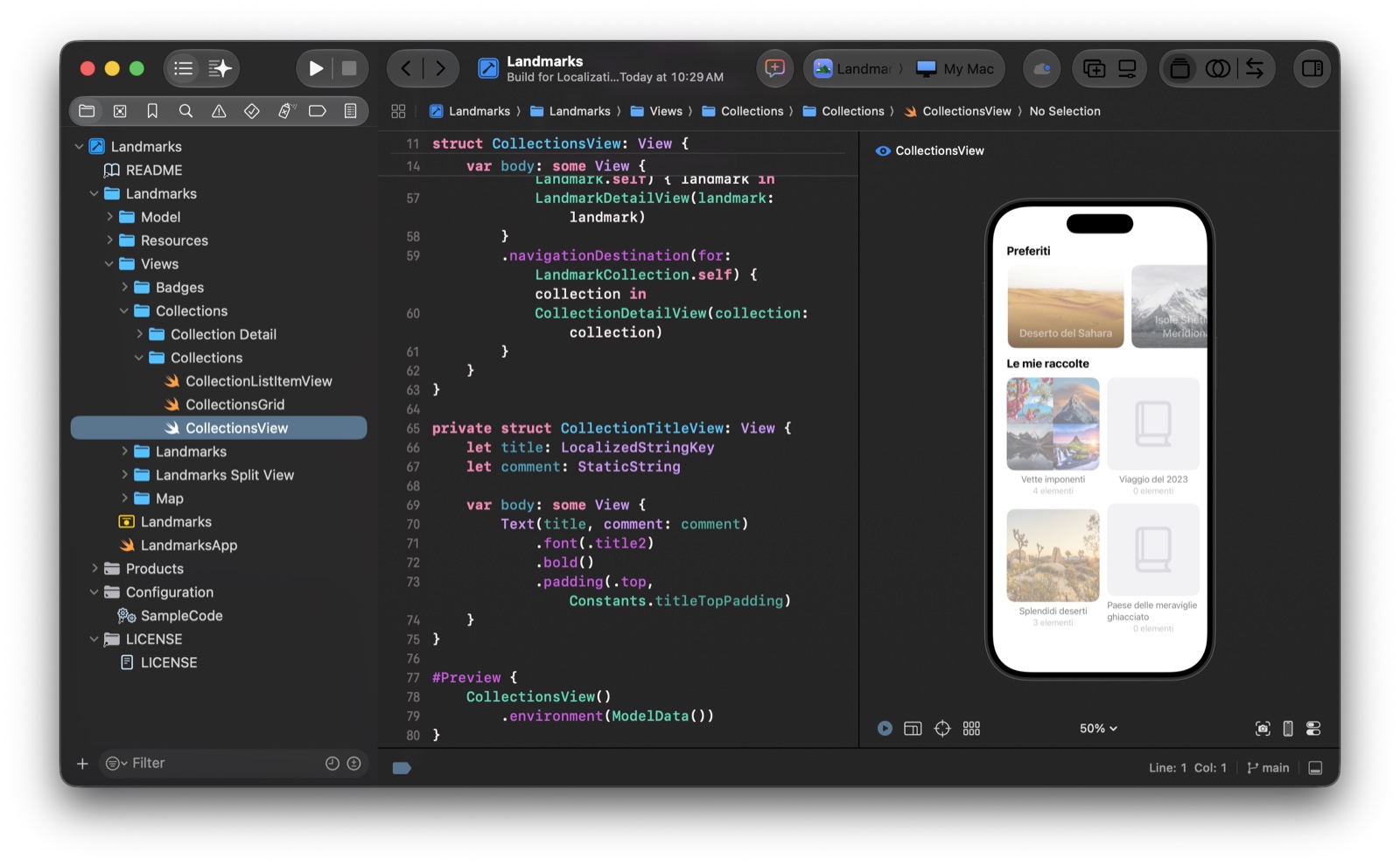
Xcode 27's translation workflow includes a check loop for this. After translation, you can either edit your scheme's Run Options to set the app's language for the next debug run, or use the SwiftUI preview to render any view in a target language directly. The agent can also do this for you and report what it sees, so a single conversation can produce the translations and then verify the rendered result:
The same loop catches more than truncation:
- Vertical clipping in tall scripts like Thai or Burmese.
- Mirrored layouts for right-to-left languages like Arabic, Hebrew, and Urdu.
- Numeric formatting drift for currencies, dates, and large numbers.
- Date and time pattern mismatches in calendars that read non-Gregorian.
For the deeper API surface around text layout, multilingual formatting, and right-to-left languages, "Build multilingual-ready apps" and "Get it right (to left)" are both worth watching when you go beyond a first launch.
What still requires a native speaker
The agent is good at producing correct, App-Store-acceptable translations across most common languages. It is not good at the last 10 percent of cultural fit. A translation can be technically right and still feel slightly off to a native speaker in a way that erodes trust.
Two concrete examples:
- An agent's default Canadian French for "landmarks" might be
lieux d'intérêt. Technically correct. A native speaker might replace it withattraits, the term the Canadian tourism industry actually uses. Both are right, only one sounds local. - A literal Canadian French translation of an app name reads correctly to the agent. A native speaker might rename it to something like
Attraits phares(Flagship attractions) for brand flair. The agent has no way to know that is the better choice.
This is the part where TestFlight does work no model can do. Recruit native speakers as beta testers in the languages you are launching. Use TestFlight's screenshot-attached feedback flow so testers can flag specific strings in context. Treat their notes as glossary updates and feed them back to the agent. The connected workflow is the same one we cover in our guide to user feedback collection: a small group of motivated native speakers will catch the issues App Store reviewers would otherwise turn into one-star complaints.
If you have ever shipped a paid app and read your reviews, you know how much "this localization is weird" hurts your conversion rate. TestFlight before launch is much cheaper than a public review afterward.
Best practices for the new workflow
A few details worth keeping when you set up your workflow:
- Use a
TRANSLATION.mdfile, notAGENTS.md, for translation guidance. Apple recommends a dedicated file the agent only reads on translation tasks. Loading translation context intoAGENTS.mdadds noise to every non-translation prompt. KeepTRANSLATION.mdseparate so the rest of your agent context stays lean. The same separation principle helps with other agent workflows we cover in AI coding assistant tools. - Put glossary, do-not-translate list, and tone in
TRANSLATION.md. Specifically: a glossary of preferred translations for key terms, a list of words that should always stay untranslated (product names, trademarks, brand phrases), and a plain-text description of the tone your app uses. - Pick a model with a large context window. Translating an app is a long-running task that benefits from holding many strings in context at once for consistency. Models that excel at extended requests do better here than fast small models.
- Mind language coverage in the model's training data. Common languages with abundant training data (French, German, Spanish, Japanese, simplified Chinese) translate well. Less-represented languages can produce noticeably weaker output. Check the model provider's documentation before committing to a launch language list.
- Check the
leveraged-mtstate qualifier. When you export localizations from Xcode, agent-produced translations are marked with theleveraged-mtqualifier. This is how you can tell at a glance which strings came from the agent and which were authored or reviewed by a human. Useful when handing exports to a vendor for QA, and useful for your own pre-launch review.
Practical rule: if you would not ship the code without testing it, do not ship the translation without testing it. The agent is faster than a vendor, but TestFlight is still the last mile.
The growth math for indie iOS apps
Localization is one of the few growth levers where the implementation cost is now genuinely low and the upside is genuinely visible on the dashboard. The case for indie iOS developers is short:
- The App Store ships in roughly 175 countries. Apple's own data has consistently shown that downloads from a country rise after an app is localized into that country's primary language.
- Subscription apps see the largest lift, because the conversion gap between "app exists in this market" and "app exists and reads natively in this market" compounds across the entire paywall funnel. For paywall-side fundamentals, see our paywall examples writeup.
- The biggest emerging markets (India, Brazil, Turkey, Mexico) are markets where price matters as much as language. Localizing the UI without localizing the price leaves the second half of the gain on the table.
The trade-offs across the four most common launch languages for indie iOS apps:
| Language | Market reach | Translation difficulty | Cultural review effort | Likely revenue lift signal |
|---|---|---|---|---|
| Spanish | Very high (Spain, Latin America, US Hispanic) | Low for Iberian, moderate for Latin American variants | Moderate (per-region) | Strong, broad |
| French | High (France, Canada, parts of Africa) | Low | Moderate (France vs Canada differences) | Strong, especially Canada |
| German | High (Germany, Austria, Switzerland) | Low | Low to moderate | Strong, paying audience |
| Japanese | High value, smaller volume | Moderate (different script and grammar) | High (formality, register) | Very strong on quality apps |
Practical rule: localization is the only growth lever where the implementation cost just dropped sharply and the audience size on the other side did not get any smaller.
This is where the Xcode 27 workflow pairs naturally with proper App Store Connect pricing. If you ship a single US price in dollars to every country, even a beautifully localized app converts poorly in markets where that price is a much larger share of monthly income. Tools that price your subscription across markets using purchasing-power-aware tiers close the loop. The UI reads native, the price reads native, the paywall converts. We cover the App Store side of this in our App Store optimization tips.
Action plan: minimum viable localization launch
The order of operations for an indie team:
- Step 0: Ask your audience which languages they want. If you have a waitlist, an email list, or any early users, run a one-question survey before you start. "Which language would you like the app in?" with the top eight to ten candidates costs an evening of effort and prevents you from spending three weekends localizing into a language nobody asked for. Tools like Lighthouse pair a waitlist signup form with built-in surveys, plus a feedback inbox you can reuse once you ship, so the same flow that collects the language request also collects the testers who care about it.
- Step 1: Audit user-facing strings. Make sure they all go through
String(localized:), SwiftUI APIs, orNSLocalizedString. Search the codebase for raw string literals shown to users and convert them. - Step 2: Set up
TRANSLATION.md. Add a glossary, a do-not-translate list, and one paragraph describing the tone you want. - Step 3: Pick three target languages. For most indie iOS apps, French, German, and Spanish (with a Latin-American variant or Iberian) cover a high percentage of the addressable audience at low translation difficulty.
- Step 4: Run the agent. Review the output. Push to TestFlight with the new languages selected in the scheme's Run Options.
- Step 5: Recruit native-speaker testers per language. Two to three motivated beta testers per language is enough to catch the bulk of issues. Use TestFlight feedback for screenshots.
- Step 6: Price the localized markets correctly. Before public launch, set App Store Connect prices per market using a purchasing-power-aware strategy.
Steps 1 through 4 can be done in a weekend. Step 5 takes one to two weeks of beta testing. Step 6 takes one form. The result is an app that addresses materially more of the App Store than it did the week before.
FAQ
Does Xcode 27 require a paid AI API key to use translation agents?
The translation agents run on the same model infrastructure as the rest of Xcode 27's agentic features. As with any agent workflow in Xcode, the tokens are not free, but the per-language cost is materially lower than a vendor pass. Treat it as a cost-per-launch rather than a recurring per-feature charge.
Can I review the agent's translations before shipping them?
Yes. Every translation lands in your String Catalog as a normal entry, marked with the leveraged-mt state qualifier. You can review them in Xcode, edit any string by hand, and the catalog tracks the change. The recommended pre-ship loop is: run the agent, do a UI render check in Xcode, push to TestFlight, get native-speaker feedback, fold corrections back into the catalog and rerun the agent only for new strings.
What if my app uses raw String literals shown to users instead of String(localized:)?
Anything outside a localizable API stays in English. Before running the agent, search your codebase for user-facing string literals and convert them to String(localized: "...", comment: "..."). Comments are the cheapest insurance against ambiguous translations. SwiftUI's Text and Button APIs are already localizable by default, so SwiftUI-first apps usually only need to convert non-SwiftUI surfaces (alerts, notification body strings, intent strings).
Which languages should an indie iOS developer localize into first?
Most indie iOS apps see the best return from Spanish, French, German, and Japanese first, in that order. Spanish covers the largest population. French opens both France and the Canadian audience. German has high willingness to pay. Japanese rewards high-quality apps disproportionately. Add Portuguese (Brazil), simplified Chinese, and Korean once the first three are stable.
Does this work with localizations exported from Xcode in older formats?
Yes. Xcode 27 can ingest localizations exported in earlier Xcode versions and merge them into String Catalogs. Existing vendor translations are preserved as normal entries (not marked leveraged-mt), so you can keep your vendor's work for languages you have already shipped and use agents for new languages or new strings only.
Xcode 27's translation agents are not a magic button that turns your app into a global product overnight. They are a meaningful drop in the marginal cost of localization, which means localization stops being a project-sized decision and starts being a normal feature decision. For indie iOS developers in particular, that shift changes which audiences are worth designing for. If you have been treating localization as something that comes after product-market-fit, the calculus is worth revisiting. The cost dropped sharply this year. The market on the other side did not get any smaller.
Spaceport generates production-ready SwiftUI Xcode projects with the boring-but-essential parts of a paid iOS app already wired up: RevenueCat subscriptions, onboarding, sign-in, analytics, an AI assistant scaffold, and App Store Connect pricing pushed across 25 markets with one of four purchasing-power-aware modes. The Xcode 27 translation workflow described above pairs naturally with that: localize the UI, price the markets right, ship. From an indie iOS dev, for indie iOS devs.