
When a user subscribes in your iOS app, the purchase travels through four layers: App Store Connect, where the product is defined; StoreKit, the on-device API that handles the actual purchase; a subscription backend like RevenueCat, which verifies the transaction and remembers who is subscribed; and your app, which checks that status and unlocks the paid features. Almost every subscription bug is really a break somewhere along that chain, so seeing the whole path is what makes them debuggable instead of mysterious.
This guide walks the flow end to end with diagrams: the four layers and what each is responsible for, exactly what happens when a user taps Subscribe, how your app knows afterward whether someone is subscribed, and the handful of places the chain most often breaks.
On this page
- The four layers
- What happens when a user taps Subscribe
- How your app knows someone is subscribed
- Where the chain breaks
- FAQ
The four layers
A subscription is not one thing in one place. It is a product defined in Apple's dashboard, a purchase handled by an on-device framework, a verified record kept by a backend, and a check your app runs. Each layer has one job, and each hands off to the next.
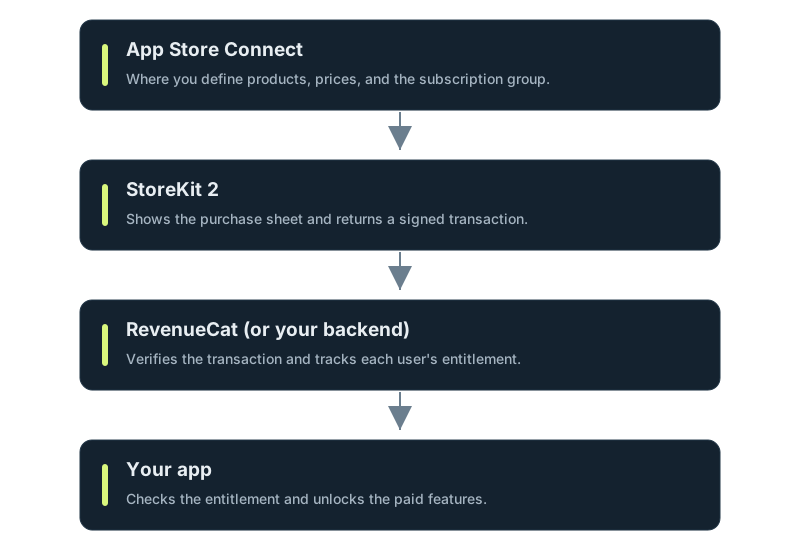
App Store Connect is where the subscription exists as a product: its identifier, its price in each territory, and the subscription group it belongs to. Nothing can be purchased that is not defined here first.
StoreKit is Apple's on-device framework. It shows the system purchase sheet, talks to the App Store, and hands your app back a signed record of the transaction. This is the only layer that actually moves money.
RevenueCat, or your own backend, takes that transaction, verifies it is genuine, and keeps the durable answer to "is this user subscribed," across devices and platforms. You can do this yourself, but it is the part most teams choose not to hand-roll.
Your app asks that backend, or StoreKit directly, whether the user currently has the entitlement, and shows or hides paid features accordingly. It is the simplest layer, and it depends on all three below it being correct.
What happens when a user taps Subscribe
Zooming into the moment of purchase, here is the sequence from tap to unlocked feature.
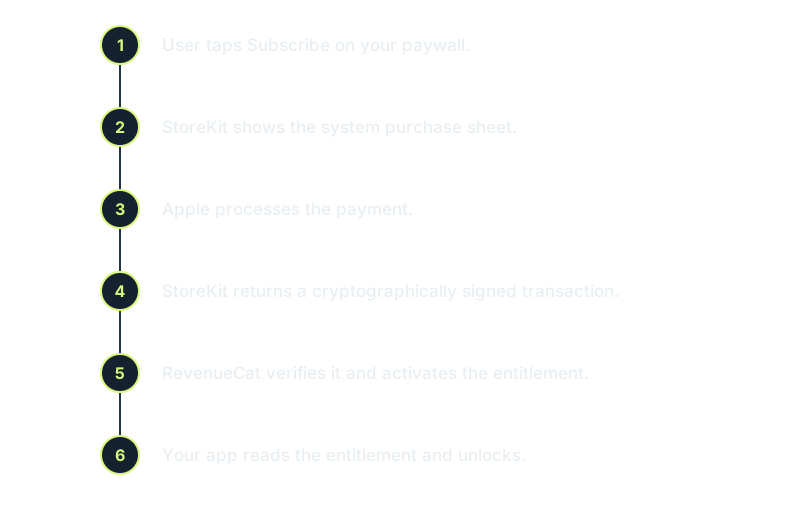
The step that surprises people is the fourth one. StoreKit does not just return "success"; it returns a cryptographically signed transaction (in StoreKit 2, a signed JWS payload). That signature is what lets your backend trust the purchase without calling Apple's servers on every check. It is also why you should never decide access from an unverified flag on the device: the signed transaction is the source of truth, and everything downstream verifies it rather than taking the app's word for it.
Note that steps five and six do not require your app to be open at the moment a renewal happens. Apple can notify your backend of renewals and cancellations server-to-server, so the entitlement stays current even while the app is closed, and your app simply reads the up-to-date answer the next time it launches.
How your app knows someone is subscribed
After the purchase, your app does not re-run the flow to check status. It reads the current entitlements. In StoreKit 2 that is Transaction.currentEntitlements, which yields the user's active, verified transactions:
import StoreKit

func hasActiveSubscription() async -> Bool {
    for await result in Transaction.currentEntitlements {
        if case .verified(let transaction) = result,
           transaction.revocationDate == nil {
            return true
        }
    }
    return false
}
The .verified case is the signature check from earlier: StoreKit confirms the transaction is genuine before you trust it. The revocationDate check handles refunds, a subscription that was refunded is revoked, and your app should lock the features again.
If you use RevenueCat, you do not write this loop. You ask its SDK whether the user has a named entitlement (hasEntitlement("pro")), and it resolves the same underlying transactions across platforms for you. Either way, the principle is identical: your UI reads a verified entitlement, it never stores its own "is subscribed" boolean as the truth.
Where the chain breaks
Because a subscription spans four layers, the bugs cluster at the handoffs. The common ones:
- Product IDs do not match. The identifier in your code has to match the product in App Store Connect exactly (and in RevenueCat, if you use it). A mismatch means the product simply does not load, and your paywall renders empty with no error. This is the single most common "my paywall is blank" cause.
- Testing against the wrong environment. During development, purchases should run against a local StoreKit configuration file or the sandbox, not production. Hitting production with incomplete metadata fails confusingly. See testing subscriptions with a StoreKit configuration file.
- Trusting the device instead of the signature. Deciding access from an unverified local flag is both a bug and a piracy vector. Always gate on the verified transaction or your backend's entitlement.
- Ignoring restores. A user who reinstalls or switches devices needs to restore purchases to get their entitlement back. If you skip the restore path, paying users lose access and file angry reviews.
- The product does not exist yet. None of this works until the subscription is actually created and priced in App Store Connect, in every market you sell in. See creating App Store subscriptions with the App Store Connect API and pricing across 25 countries.
FAQ
What are the parts of an iOS subscription?
Four layers: App Store Connect (where the product and its prices are defined), StoreKit (the on-device API that handles the purchase), a subscription backend like RevenueCat (which verifies the transaction and tracks entitlements), and your app (which checks the entitlement and unlocks features).
How does my app know if a user is subscribed?
It reads the current entitlements, not a stored flag. In StoreKit 2 that is Transaction.currentEntitlements, filtered to verified transactions without a revocation date. RevenueCat wraps this in a single entitlement check across platforms.
What is a signed transaction in StoreKit 2?
When a purchase completes, StoreKit returns a cryptographically signed record (a JWS payload) rather than a plain success flag. The signature lets your backend verify the purchase is genuine without calling Apple on every check, and it is why you should gate access on the verified transaction rather than a device-side boolean.
Do I need RevenueCat to sell subscriptions?
No. StoreKit 2 can handle purchases and entitlement checks on its own. RevenueCat exists because verifying transactions, tracking entitlements across devices and platforms, and handling restores and refunds is real work most teams prefer not to build and maintain themselves.
Why is my paywall showing no products?
Almost always a product ID mismatch or the wrong environment. The identifiers your code requests must match the products in App Store Connect (and RevenueCat) exactly, and in development you should be pointed at a StoreKit configuration file or the sandbox, not production.
Do subscriptions renew while my app is closed?
Yes. Renewals happen on Apple's servers, and Apple can notify your backend server-to-server, so the entitlement stays current even when the app is not running. Your app simply reads the up-to-date entitlement the next time it launches.
Spaceport generates a production-ready SwiftUI Xcode project with all four of these layers already connected: the subscription products created and priced in App Store Connect across 25 markets, RevenueCat wired for verification and entitlements, and the paywall, purchase, and restore flow working on the first build. You get the whole chain assembled correctly instead of debugging the handoffs by hand. And before any of it matters, you need users: Lighthouse is the sibling toolkit for the waitlist and newsletter that get you your first hundred. From an indie iOS dev, for indie iOS devs.